Architecture
System Context
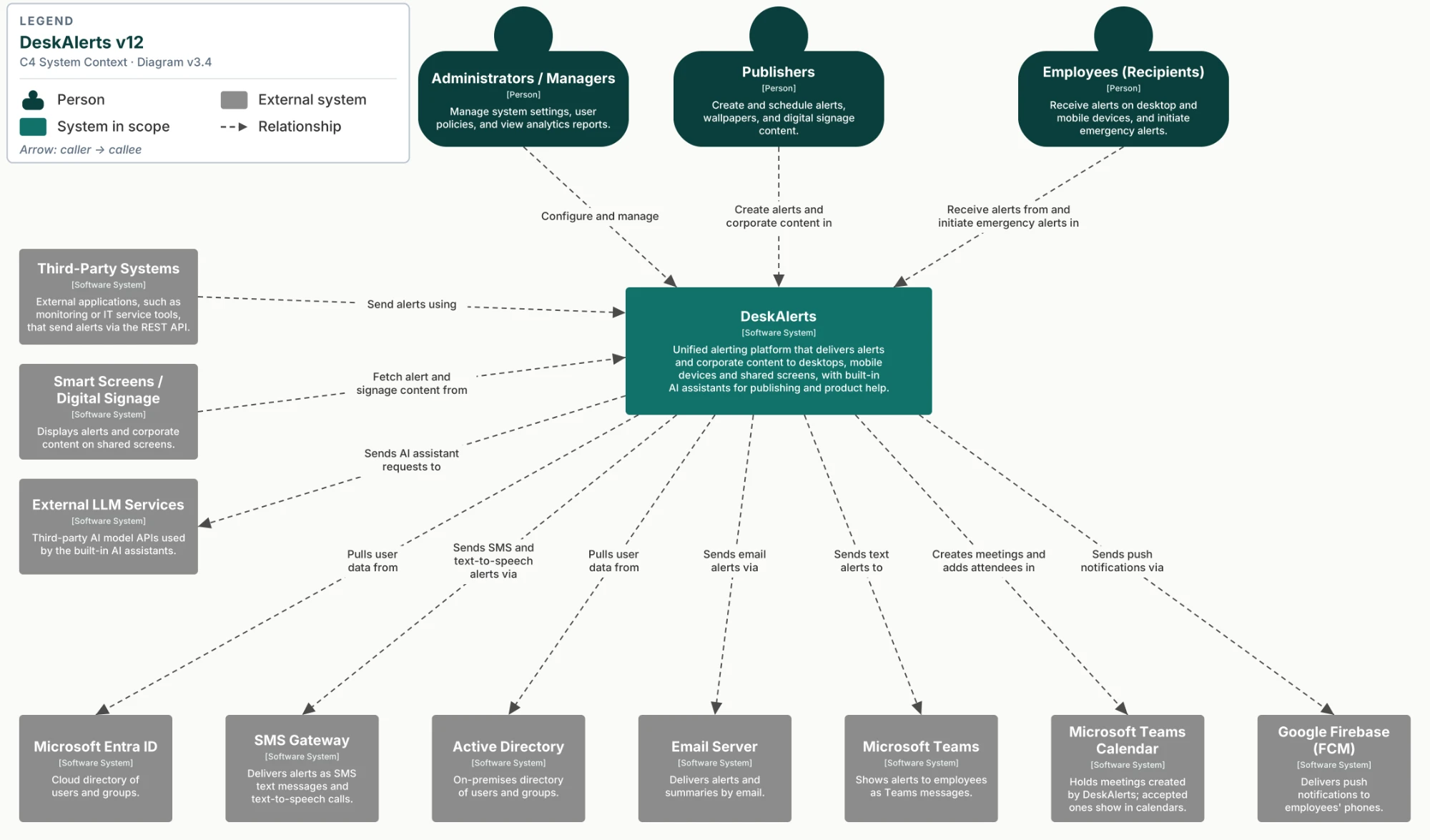
People
| Person | Role |
|---|---|
| Administrators / Managers | Manage system settings, user policies, and view analytics reports |
| Publishers | Create and schedule alerts, wallpapers, and digital signage content |
| Employees (Recipients) | Receive alerts on desktop and mobile devices, and initiate emergency alerts |
External systems
| System | Description | Relationship |
|---|---|---|
| Third-Party Systems | External applications, such as monitoring or IT service tools | Send alerts using the DeskAlerts REST API |
| Smart Screens / Digital Signage | Display alerts and corporate content on shared screens | Fetch alert and signage content from DeskAlerts |
| External LLM Services | Third-party AI model APIs used by the built-in AI assistants | DeskAlerts sends AI assistant requests to them |
| Microsoft Entra ID | Cloud directory of users and groups | DeskAlerts pulls user data from it |
| Active Directory | On-premises directory of users and groups | DeskAlerts pulls user data from it |
| SMS Gateway | Delivers alerts as SMS text messages and text-to-speech calls | DeskAlerts sends SMS and text-to-speech alerts via it |
| Email Server | Delivers alerts and summaries by email | DeskAlerts sends email alerts via it |
| Microsoft Teams | Shows alerts to employees as Teams messages | DeskAlerts sends text alerts to it |
| Microsoft Teams Calendar | Holds meetings created by DeskAlerts; accepted ones show in calendars | DeskAlerts creates meetings and adds attendees in it |
| Google Firebase (FCM) | Delivers push notifications to employees' phones | DeskAlerts sends push notifications via it |
Containers
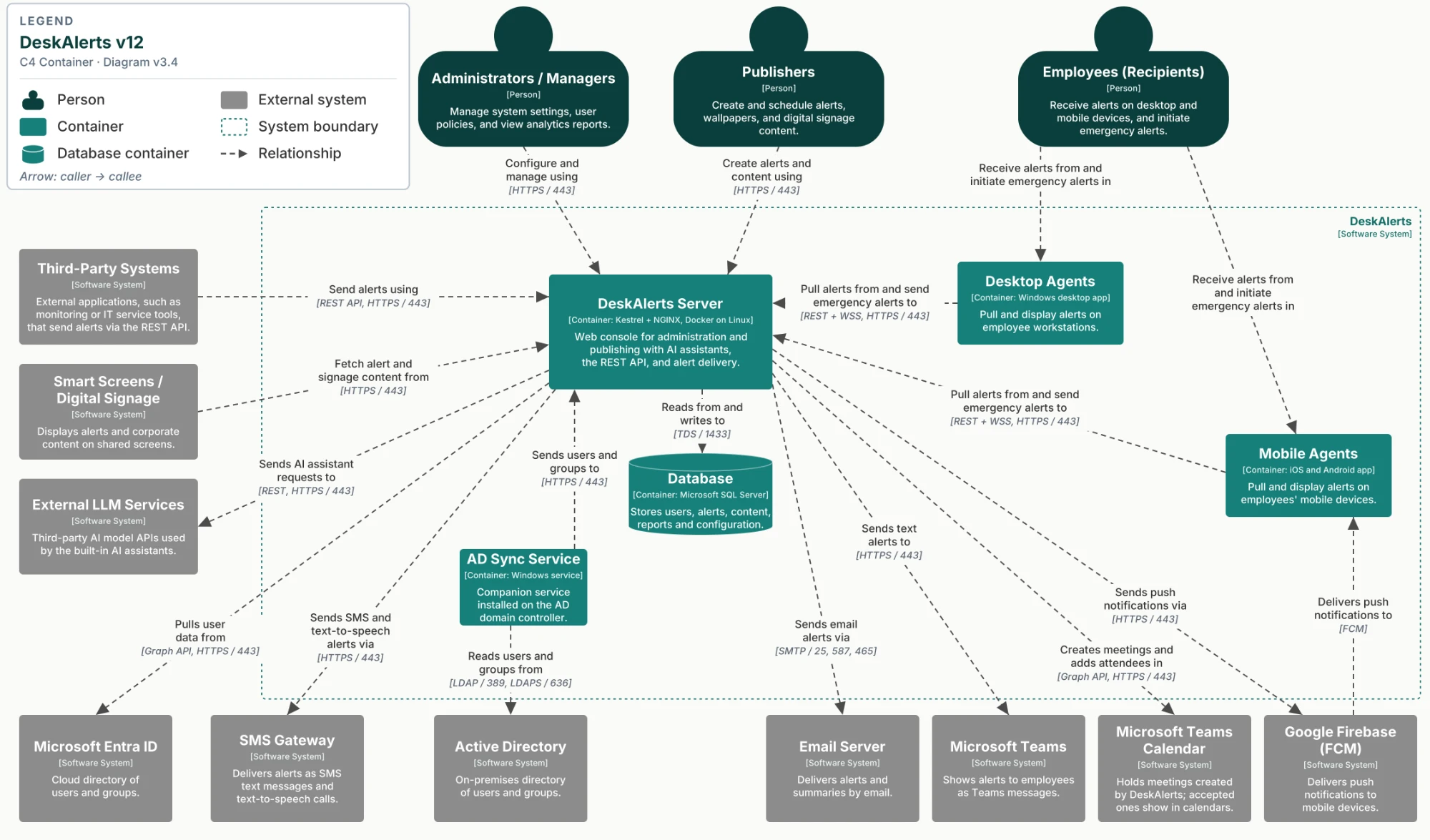
DeskAlerts containers
| Container | Technology | Description |
|---|---|---|
| DeskAlerts Server | Kestrel + NGINX, Docker on Linux | Web console for administration and publishing with AI assistants, the REST API, and alert delivery |
| Database | Microsoft SQL Server | Stores users, alerts, content, reports, and configuration |
| Desktop Agents | Windows desktop app | Pull and display alerts on employee workstations |
| Mobile Agents | iOS and Android app | Pull and display alerts on employees' mobile devices |
| AD Sync Service | Windows service | Companion service installed on the AD domain controller |
Connections
| From | To | Purpose | Protocol / port |
|---|---|---|---|
| Administrators / Managers | DeskAlerts Server | Configure and manage | HTTPS / 443 |
| Publishers | DeskAlerts Server | Create alerts and content | HTTPS / 443 |
| Desktop Agents | DeskAlerts Server | Pull alerts and send emergency alerts | REST + WSS, HTTPS / 443 |
| Mobile Agents | DeskAlerts Server | Pull alerts and send emergency alerts | REST + WSS, HTTPS / 443 |
| Third-Party Systems | DeskAlerts Server | Send alerts | REST API, HTTPS / 443 |
| Smart Screens / Digital Signage | DeskAlerts Server | Fetch alert and signage content | HTTPS / 443 |
| DeskAlerts Server | Database | Read and write | TDS / 1433 |
| AD Sync Service | DeskAlerts Server | Send users and groups | HTTPS / 443 |
| AD Sync Service | Active Directory | Read users and groups | LDAP / 389, LDAPS / 636 |
| DeskAlerts Server | Microsoft Entra ID | Pull user data | Graph API, HTTPS / 443 |
| DeskAlerts Server | SMS Gateway | Send SMS and text-to-speech alerts | HTTPS / 443 |
| DeskAlerts Server | Email Server | Send email alerts | SMTP / 25, 587, 465 |
| DeskAlerts Server | Microsoft Teams | Send text alerts | HTTPS / 443 |
| DeskAlerts Server | Microsoft Teams Calendar | Create meetings and add attendees | Graph API, HTTPS / 443 |
| DeskAlerts Server | Google Firebase (FCM) | Send push notifications | HTTPS / 443 |
| Google Firebase (FCM) | Mobile Agents | Deliver push notifications | FCM |
| DeskAlerts Server | External LLM Services | Send AI assistant requests | REST, HTTPS / 443 |