About HTTP Security Headers
With our new release DeskAlerts 11.0, we are striving to make our software compliant with OWASP ASVS 4.0.3, but sometimes we move a bit further, for the HTTP security headers particularly. This post is the most comprehensive overview of all relevant HTTP security headers at the moment.
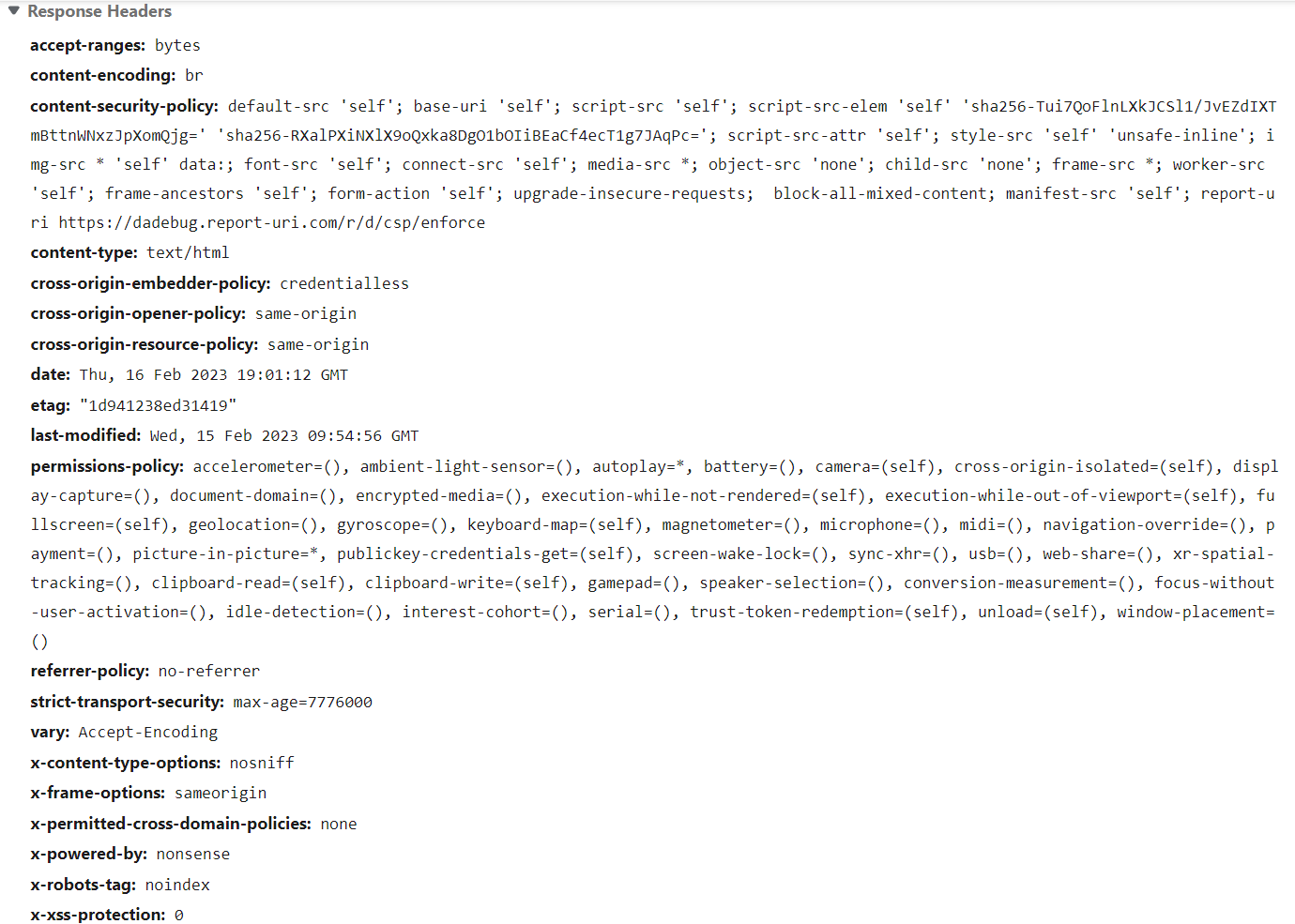
The headers we have implemented in DeskAlerts 11:
X-XSS-Protection: This header is used to prevent XSS attacks by detecting and blocking malicious scripts. It tells the browser to automatically block any content that appears to be an XSS attack, but as for the latest recommendations, this header should be turned off explicitly. Most modern browsers have deprecated it.
X-Content-Type-Options: This header helps prevent MIME-sniffing attacks by informing the browser that it should only render the content as the specified MIME type.
X-Frame-Options: This header is used to prevent clickjacking attacks. It tells the browser whether or not the content of a webpage should be allowed to be rendered within an iframe. The Content Security Policy header is prioritized over this one.
Strict-Transport-Security (HSTS): This header is used to enforce the use of secure connections (HTTPS) for your website. It tells the browser to automatically upgrade to HTTPS for all future requests to the same domain.
Content-Security-Policy (CSP): This header is used to restrict the types of content that can be loaded on a page. This helps prevent XSS and other attacks by blocking malicious content. It is very powerful and can break your website pretty much completely, so we recommend testing it thoroughly using a reporting header Content-Security-Policy-Report-Only. Please, don’t put “unsafe-inline” and “unsafe-eval” anywhere, especially into “script-src” – there is no point in CSP if you do this. In DeskAlerts 11 we had to put only one “unsafe-inline” in “style-src” because of utilizing a WYSIWYG editor in our app.
Permissions-Policy: This header allows websites to declare a policy for the permissions they request from users. It provides a way for sites to communicate to the browser which features, such as geolocation or camera access, are required for the site to function properly. By setting the header, site owners can help prevent users from accidentally granting permissions they don't intend to give, while still allowing access to necessary features.
Referer-Policy: The header controls the behavior of the Referer header in a request. It determines what information, if any, is sent about the referrer in a request. The header can be set to various values to specify the level of referrer information that is sent, ranging from sending the full URL to not sending any referrer information at all.
X-Permitted-Cross-Domain-Policies: This header is used to specify the policy for cross-domain requests made by Adobe Flash Player and Adobe Reader. The header defines which types of cross-domain requests are allowed, such as requests for content or data from other domains. By setting this header, a website can specify that only certain types of cross-domain requests are permitted, helping to prevent security vulnerabilities associated with malicious cross-domain requests. This header is mostly deprecated, but we are still using it in case an older browser tries to open our web app.
Cross-Origin-Embedder-Policy (COEP): The header controls the types of resources that can be embedded in a page from other domains, such as iframes or images. The header can be set to values such as "same-origin" or "unsafe-none" to specify the level of access that is allowed for cross-origin resources, but we are using an experimental value “credentialless” – more about it in future posts and my thanks go to Google for proposing it. But this works only in Chrome and Chromium-based browsers for now.
Cross-Origin-Opener-Policy (COOP): This header determines the level of access that a website has to the window object of a page that was opened by another website. We are using the most restrictive value “same-origin”.
Cross-Origin-Resource-Policy (CORP): This header specifies the policy for cross-origin resource sharing for a specific resource, such as an image or script. We are using the most restrictive value “same-origin”.
C-c-c-ombo - Restrictive COEP + COOP = Cross-Origin Isolated environment: Combo of both these headers in restrictive mode gives us a mitigation against side-channel attacks like the infamous Spectre vulnerability. COEP can be set to “credentialless” for this combo to work.
We are analyzing how to properly implement the following header-like security mechanisms in future releases:
Trusted Types API of the Content-Security-Policy (CSP): For me, it’s like an addon for Chrome and Chromium-based browsers to the CSP. This header is a brand-new security feature designed to prevent Document Object Model (DOM) cross-site scripting (DOM XSS) attacks. It allows websites to declare a policy for the types of values that are allowed to be used as parameters in certain APIs, such as when creating a DOM element or when evaluating JavaScript code. It’s very tricky to implement the feature, so we decided to postpone it to the next release.
Fetch Metadata headers: Also a brand new security headers allow websites to declare a policy for the information that is sent during cross-origin resource requests. These headers provide a way to control the exposure of sensitive information, such as the referrer or user-agent, in cross-origin requests. By using the Fetch Metadata header, you can mitigate CSRF, XSSI, and cross-origin information leaks.
Cache-Control: This header controls the caching behavior of a web page in a browser's cache. It determines whether a page is stored in the cache, how long it is stored, and whether it can be re-used for subsequent requests. By setting appropriate values for the Cache-Control header, a website can improve its security by ensuring that sensitive information is not stored in the cache, where it could potentially be accessed by malicious actors.